Traversr Research the web, with sources

Answers you can check. Without the 23 tabs.

Searching leaves you with a pile of tabs and no idea which one to believe. Asking an AI gets you a confident paragraph you cannot verify. Traversr reads the web for you, checks the sources against each other, and shows you where every sentence came from.

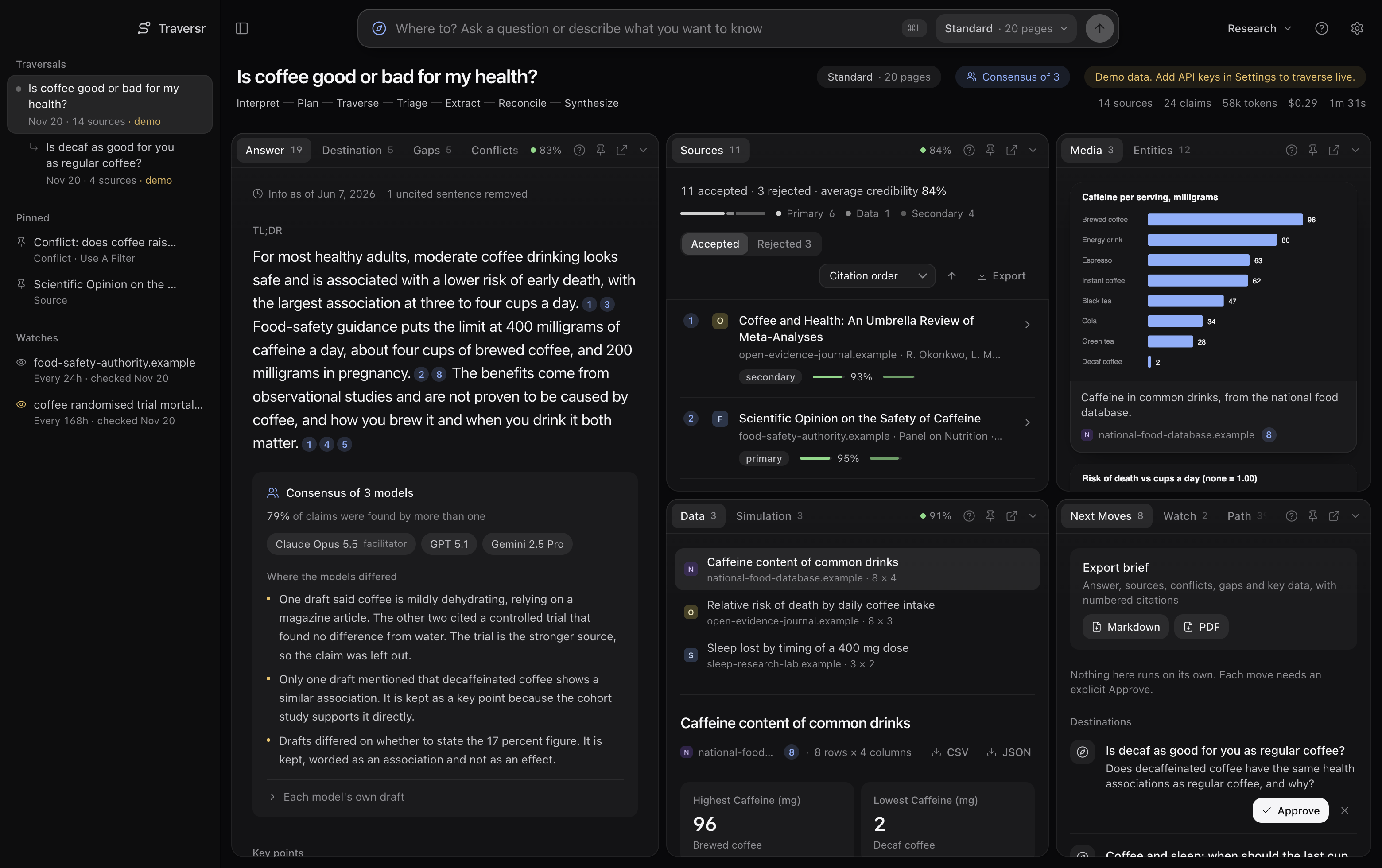
Is coffee good or bad for my health?
The Traversr window after answering 'Is coffee good or bad for my health?': a cited answer, scored sources, data and suggested next steps

A real Traversr window, not a mock-up. It shows a sample question: the publications are placeholders and the figures are for illustration, not medical advice.

The problem

Getting a straight answer online is harder than it should be.

You have a real question. You have two ways to answer it, and both let you down.

You can search

Ten results. Ten tabs. Cookie banners, paywalls and articles written to sell you something. An hour later you have read a lot and decided nothing.

  • Which one is right?
  • Who wrote this?
  • Is this an ad?
  • Where did I read that?

Or you can ask an AI

One tidy, confident paragraph in seconds. It sounds right. You have no way to tell whether it is, and neither does the AI.

  • Says who?
  • Which studies?
  • What did it leave out?
  • Is any of that made up?

Traversr is the third way.

It does the reading a careful person would do, on more pages than you have time for, and then shows its work so you never have to take its word for it.

See what that looks like

How it helps

The doubts you have about any answer. Dealt with, one by one.

Same question throughout: is coffee good or bad for my health? Every picture below is the real app.

"Did the AI just make that up?"

Every sentence shows you where it came from.

Each sentence in the answer carries numbered citations. Click one and you see the source text itself, with the exact passage highlighted. No hunting through a page to find what it was talking about.

And if the AI writes a sentence it cannot back with a source, Traversr removes it before you ever see it, and tells you it did.
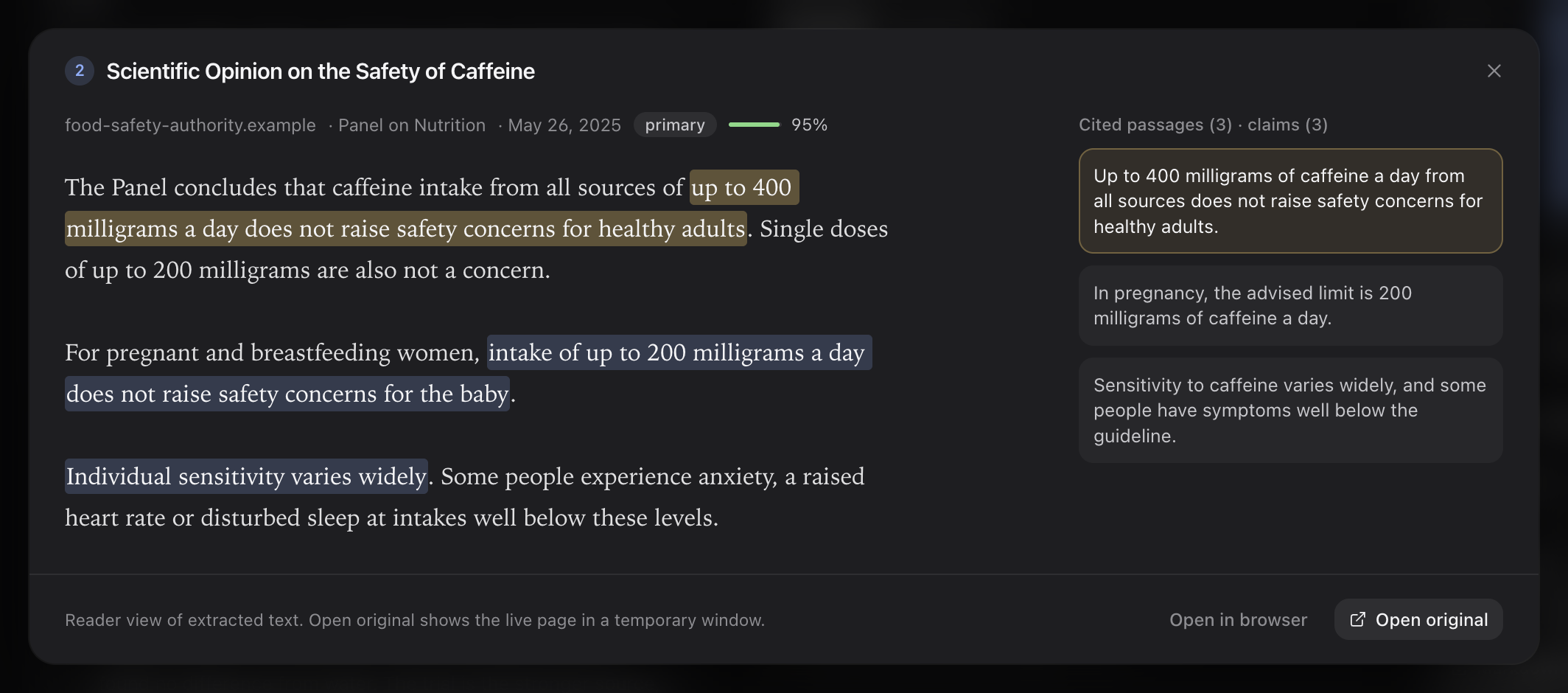
Traversr reader view showing a source with the three cited passages highlighted

"Who am I supposed to believe?"

It checks who is talking before it listens.

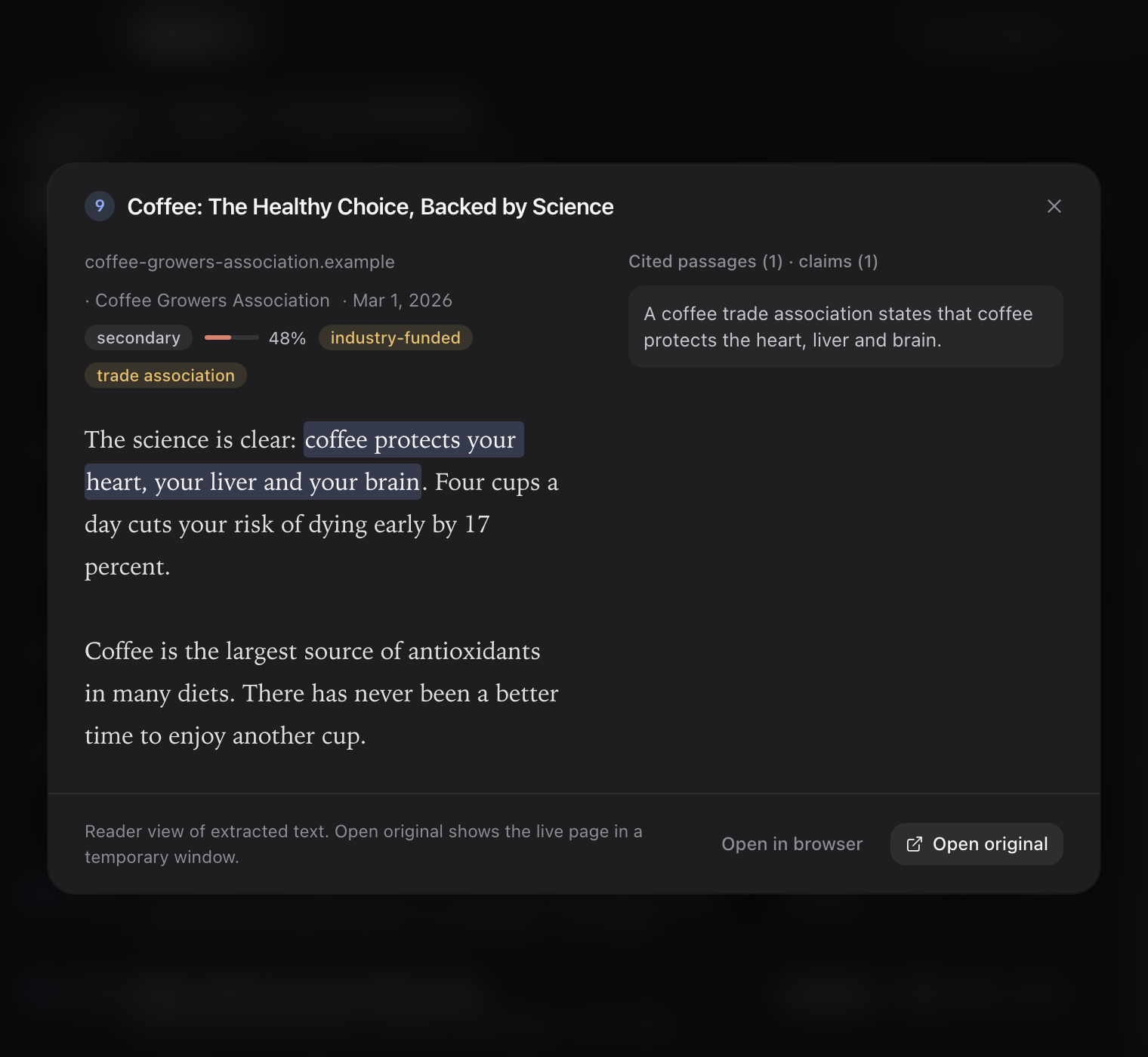
Every page is scored for how far it can be trusted on your question, with the reasons. A trade body praising its own product gets flagged. Sponsored posts, anonymous forums and out-of-date pages are set aside, and kept on record so you can see what was left out and why.

A coffee trade association page scored 48 percent credibility and flagged as industry-funded

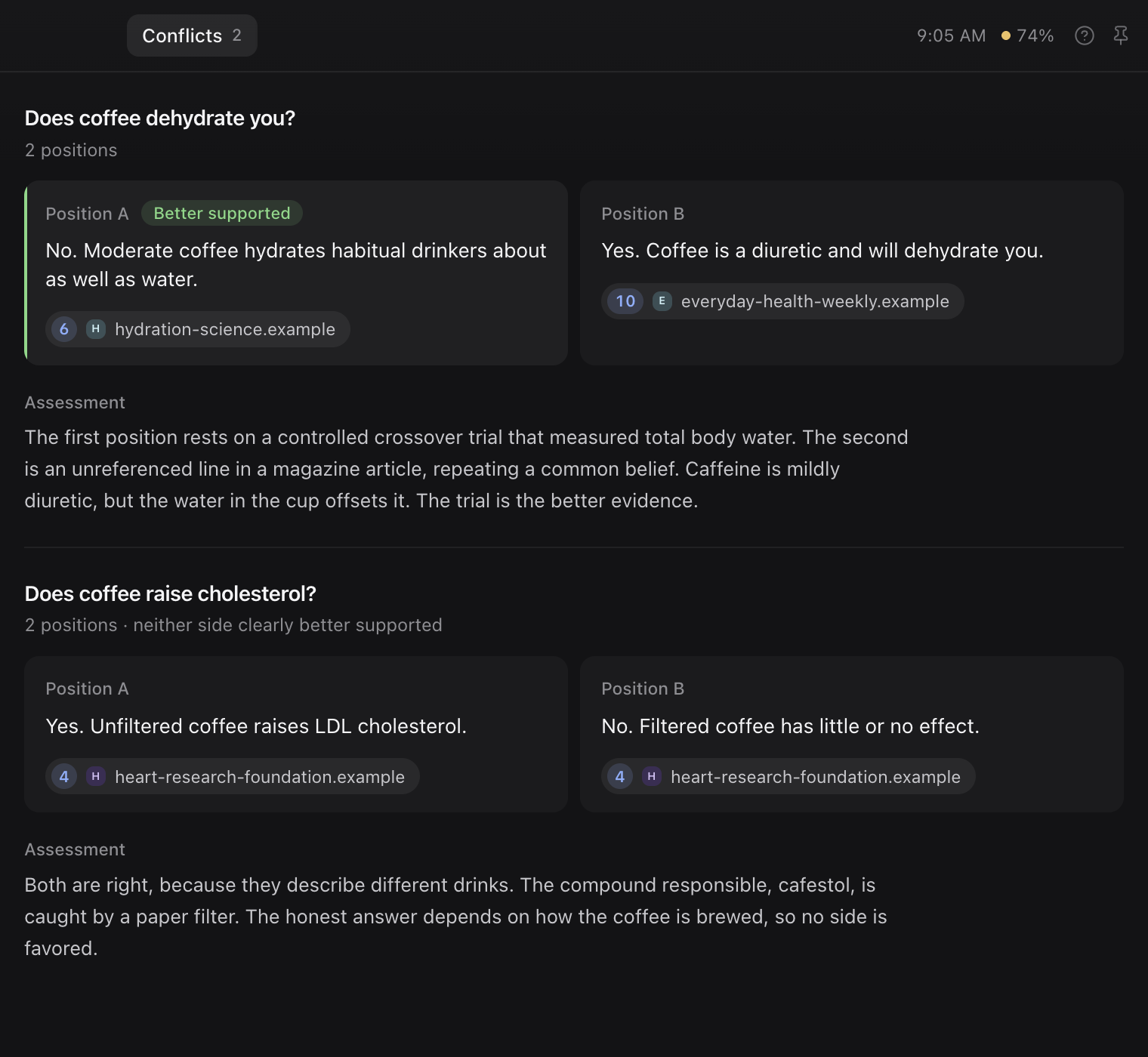
"Two sites say opposite things."

It puts the disagreement in front of you.

When sources conflict, you get both positions side by side, the evidence behind each, and a plain assessment of which is better supported. Sometimes the honest answer is "both are right, they mean different things", and it says that too.

Conflicts pane comparing two positions on whether coffee dehydrates you, with an assessment

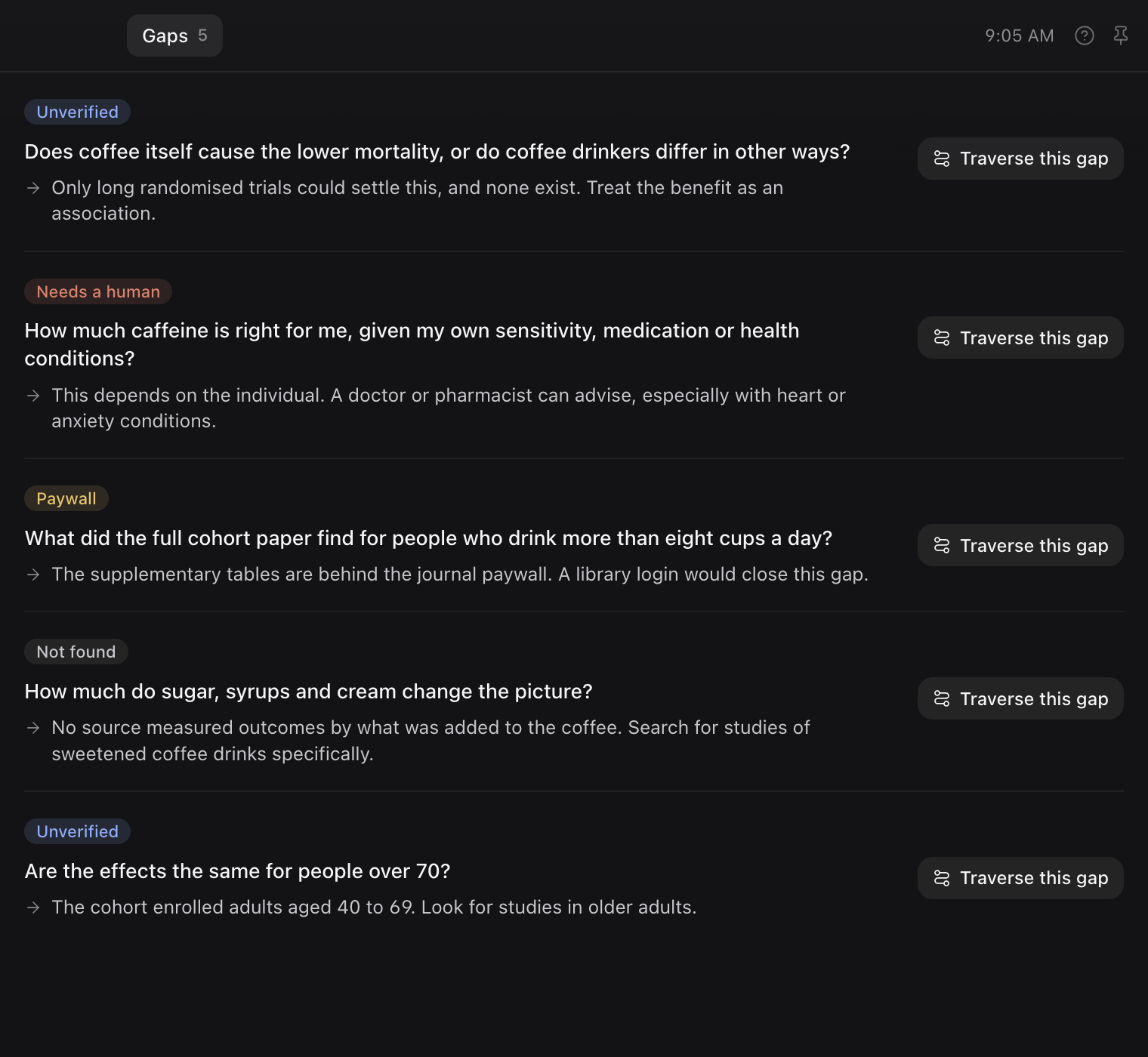
"What am I not being told?"

It tells you what it could not find.

Most tools hide their blind spots. Traversr lists them: what is unproven, what was behind a paywall, what nobody seems to have studied, and what really needs a professional. Each one comes with a suggestion for how to close it.

Gaps pane listing five open questions, each labelled unverified, paywall, not found or needs a human

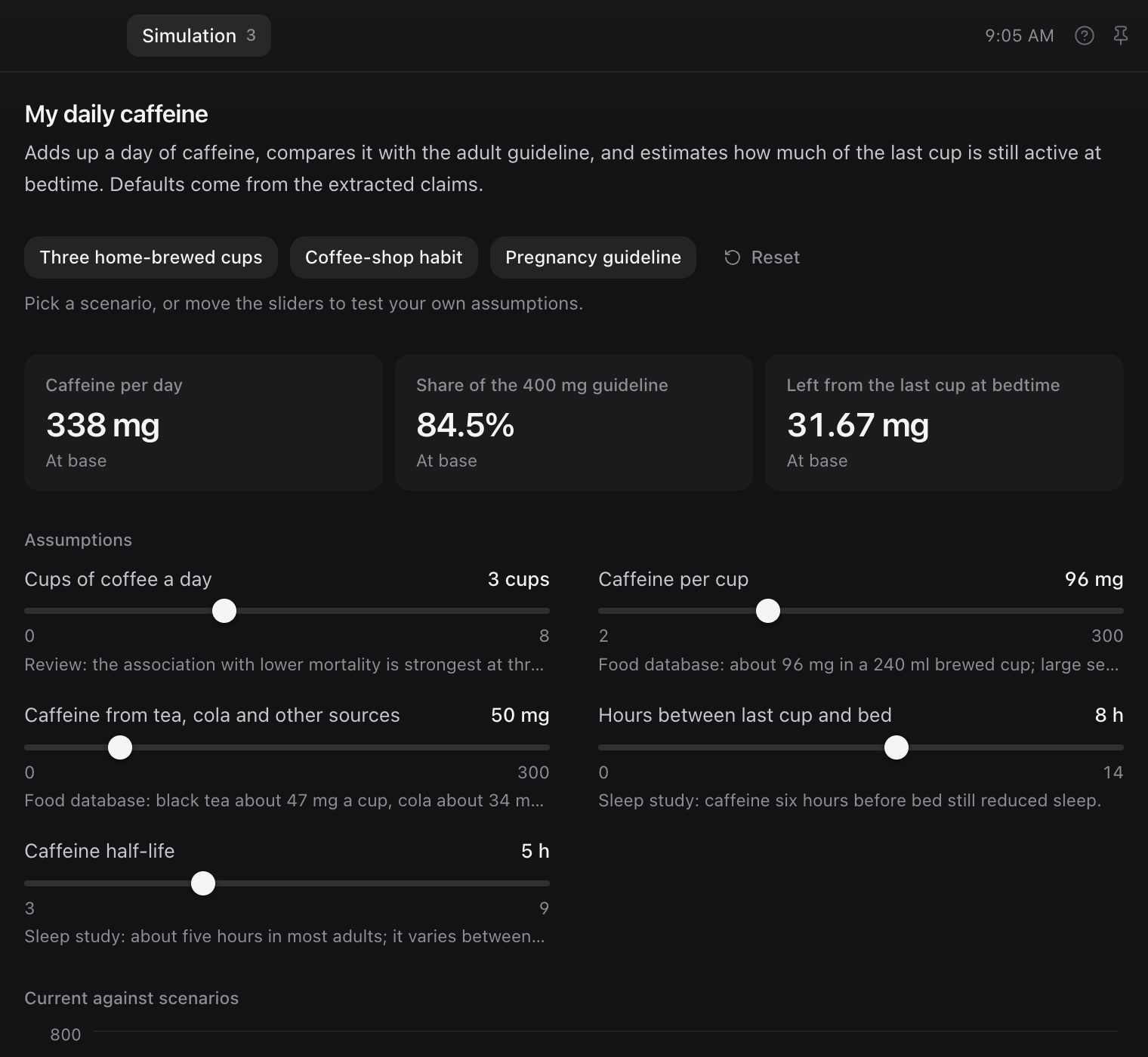
"Fine, but what does that mean for me?"

It turns the findings into numbers you can play with.

The figures it found become a small model with sliders. Change the assumptions to match your own situation and watch the result move. Tables it came across are there too, ready to sort or export.

Simulation pane with sliders for cups of coffee a day and caffeine per cup, and the resulting daily total

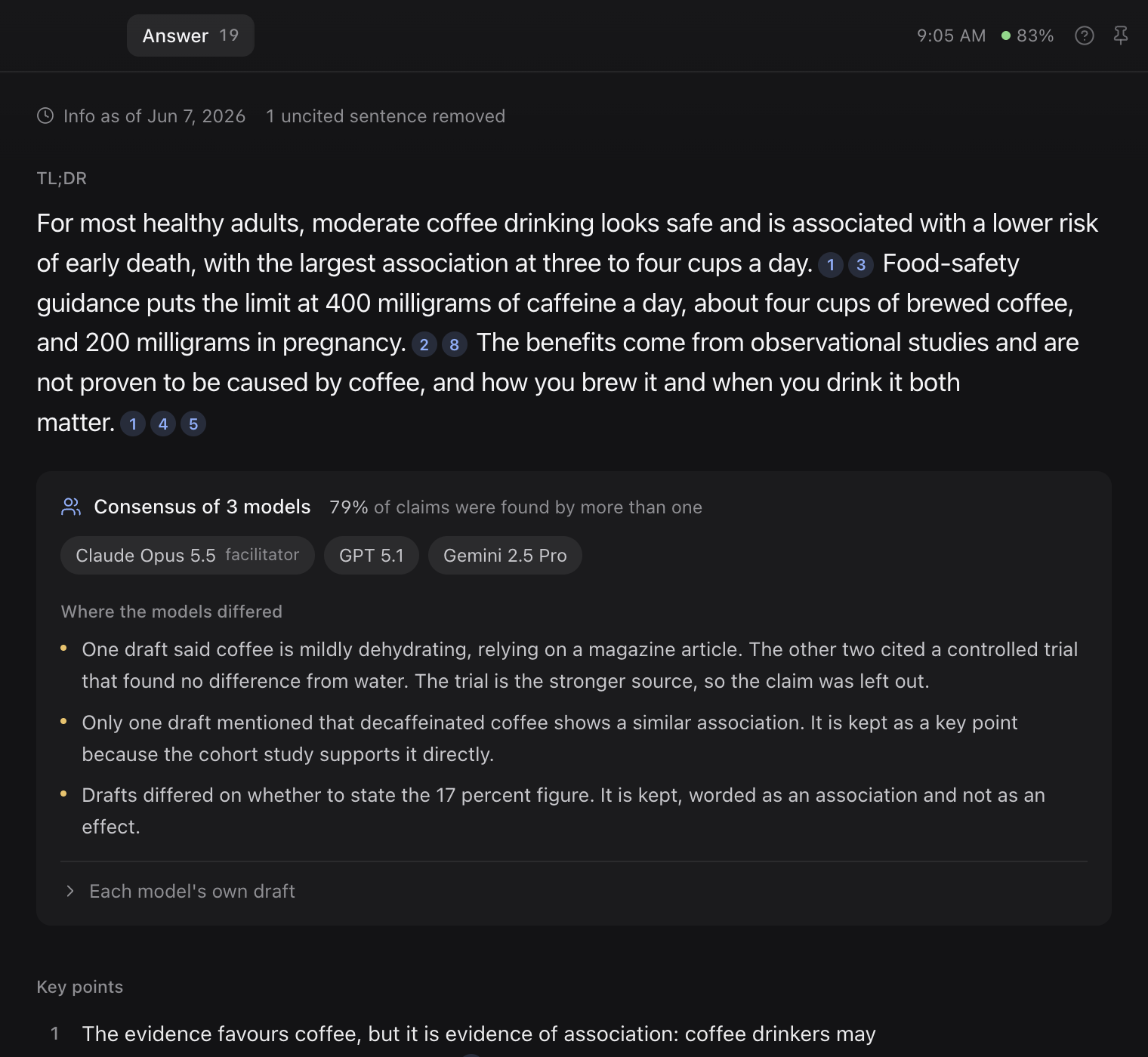
"What if the AI itself is wrong?"

Ask three, and see where they disagree.

Connect more than one AI provider and each reads the same pages independently. Traversr merges what they agree on, marks down what only one of them claimed, and lists where they differed. A second opinion, built in.

Answer pane showing a cited summary and a consensus of three AI models with the points where they differed

How it works

Ask once. Get on with your day.

1

You ask a question

In plain words, the way you would ask a well-read friend. Traversr restates what it thinks you mean, and you can correct it.

2

It reads and cross-checks

It searches, reads up to 40 pages, scores each one, pulls out the facts and compares them. Results fill in as it goes, so you can start reading before it finishes.

3

You get an answer you can check

A short summary first, then as much evidence as you want to look at. Export it as a cited brief when you need to share it.

Want the detail? Every stage is explained in the help centre.

What people ask

Any question where being right matters more than being quick.

Health

Is coffee good or bad for my health?

Money

Is it better to pay off my mortgage early or invest the money?

Big purchases

Is an electric car cheaper to own than a petrol one over five years?

Home

Is a heat pump worth it for an older house?

Work

What do customers complain about most with project management software?

News and claims

Do four-day work weeks really make people more productive?

Learning

What is the most effective way to learn a language as an adult?

Family

How much screen time is too much for a seven-year-old?

Travel

When is the best time of year to visit Japan, and what does it cost?

One answer usually raises the next question. Follow any gap or suggestion with a click, and set a watch to be told when a page changes.

Fair questions

"Where does my research go?" Nowhere you did not send it.

It stays on your computer

  • No account, no tracking, no ads. Traversr has no server of its own and reports what you do to no one.
  • Saved locally. Your questions and answers live in a file on your own machine.
  • You choose the AI. Requests go straight from your device to the provider you pick, using your own key, which is locked in your system keychain.
  • You set the budget. Each question has a spending cap, 50 cents by default. It stops when it gets there.
AnthropicOpenAIxAIDeepSeekGoogle GeminiMistralGroqOpenRouter

It only reads, and it reads politely

  • It never acts for you. No logging in, no forms, no purchases, no messages. Suggestions wait for your approval.
  • It respects the sites it visits. It follows their robots.txt rules, takes its time, and says honestly what it is.
  • It does not pick locks. Paywalls and bot checks are left alone and reported to you as gaps.
User-Agent: TraversrBot/0.1
GET /robots.txt 200 allowed
GET /opinions/safety-of-caffeine 200 read
GET /papers/supplementary-tables 403 paywall, reported as a gap

Questions

The short answers.

How is this different from asking a chatbot?

A chat gives you a paragraph and asks you to trust it. Traversr shows you every page it read and how far it trusted each one, the pages it rejected and why, where sources disagree, and what it could not find. Citations are checked by the app itself after the AI has finished writing, so a sentence with no source does not reach you.

Can it still get things wrong?

Yes, and it is built to make that easy to catch. Its trust scores are an AI's judgement, not a measurement, and a cited sentence can still misread its source. That is why the passage behind every sentence is one click away. When a point matters, such as your health or your money, read the passage yourself and talk to a professional.

Can I try it without setting anything up?

Yes. Traversr opens with a complete sample you can explore. To ask your own questions you add a key from an AI provider, which is a one-time copy and paste in Settings.

What does it cost to ask a question?

You pay your AI provider directly for what you use. Each question has a spending cap, 50 cents by default, which you can raise or lower. Reading fewer pages or choosing a cheaper AI model brings the cost down.

Is it a web browser?

No. You do not visit pages in Traversr. You ask, and it brings back the answer with its evidence. If you want to see an original page, it opens in a temporary window that keeps nothing afterwards, or in your own browser.

Read all the questions

What do you want to know?

Traversr 0.1 is an early release for macOS, Windows and Linux. Explore the built-in sample first, then ask your own questions.

macOSApple silicon and Intel Download
Windowsx64 and Arm Download
LinuxAppImage and .deb Download

Asking your own questions needs a key from an AI provider. Usage is billed by that provider.